The main hall has led light strips along the walls and around the stage that may add to the atmosphere for your event and which you are welcome to use. The controller is on the stage floor (opposite side to the steps) and there are instructions with the controller.
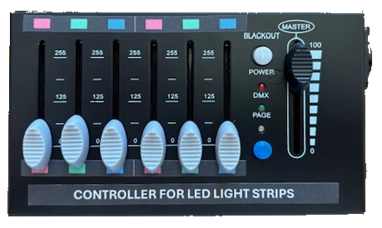
The LED lighting strips around the stage and along the sides of the main hall can be used independently from the stage lighting system using the controller pictured here. The on/off switch is on the side.
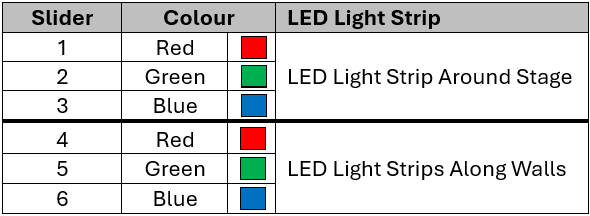
The six slider controls* are used to set the colours of the lighting strips. The first 3 sliders operate the lighting strip around the stage and the second 3 sliders operate the lighting strips along the walls of the hall. The ‘MASTER’ slider controls the brightness of the lights. The ‘BLACKOUT’ button can be used to turn off all of the lights. *If the sliders are not working, press the blue button once and try again.
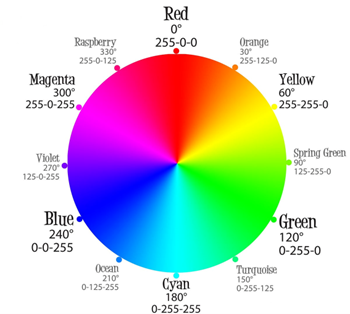
The colour of the LED light strips can be changed by varying the levels of red, green and blue. Every colour has a corresponding ‘RGB’ value that represents the proportions of each colour (0-255) that can be combined to produce the required colour.
For example, pink (raspberry) has an RGB value of 255-0-125. The red slider needs to be at its highest setting (255 / 100%). The green slider needs to be at its lowest setting (0 / 0%). The blue slider needs to be around halfway (125 / 49%).
The kitchen is well stocked with a selection of different crockery including cups, saucers, bowls & plates.
78 cups
178 saucers
144 medium cups
33 saucers
100 small cups
21 saucers
109 plates (21.5 cm)
133 plates (16 cm)
62 bowls (16 cm)
95 plates (25cm)
28 plates (26 cm)
57 assorted plates
26 Bowls (17 cm)
Hearing Loop
The sound system in the main hall incorporates a PDA Range 500/2 Induction Loop Amplifier.
Main Hall Projector
The main hall has a projector mounted on the lighting bar in front of the stage. The projector is an NEC VT670 projector and is operated by a remote control.
The projector has two inputs, a VGA input with an HDMI adapter for use with a laptop; and a video input with an RCA plug (yellow) which can be used with the hall’s DVD player.
Sound System
The main hall is equipped with a sound system and speakers for playing music (recorded or live) and/or using with microphones.
The system is controlled by a Soundcraft Spirit E8 10-channel mixer (8 mono mic/line , 2 stereo line inputs).